









When people ask us what the best handheld 3D scanner is in 2026, they’re usually expecting a simple answer.
The reality is a little more complicated.
The best scanner for reverse engineering isn’t necessarily the best scanner for body scanning. A device that's ideal for scanning mechanical parts may not be the most practical choice for artists, creators, or small businesses. And a scanner with the most impressive specifications on paper isn't always the one that delivers the best day-to-day experience.
The handheld scanning market has matured significantly over the past few years. Features that were once limited to high-end industrial systems—real-time tracking, wireless workflows, high-resolution geometry capture, and advanced processing software—are now available to a much broader audience.
At EINSTAR, powered by SHINING 3D, we've had a front-row seat to the evolution of handheld scanning technology over the past few years.
And it's also why we believe the conversation has changed.
The question is no longer:
"Which scanner has the highest accuracy?"
The better question is:
"Which scanner helps me complete my work more efficiently and more reliably?"
What Makes a Great Handheld 3D Scanner in 2026?
Key factors include:
● Reliable Data Quality: Clean, complete, and usable scan data with minimal noise and strong geometry preservation across different surfaces and object types.
● Stable Tracking: Fast, reliable tracking that maintains alignment across large objects, complex geometry, and changing scan paths without interruptions or drift.
● Superior Material Adaptability: Able to handle reflective, curved, or recessed surfaces across multiple projects.
● Usable Software: Intuitive tools for mesh cleanup, alignment, and export, reducing post-processing time.
● Portability: Wireless, ergonomic, and lightweight for long sessions.
● Versatility: Suitable for creators, engineers, automotive work, product design, and hobbyists alike.
In conclusion, the best handheld 3d scanner will balance precision with practicality—making scanning faster, easier, and more reliable for a wide variety of real-world projects.
So, Why EINSTAR Rockit?
Simple: after testing it extensively in real-world environments—not controlled lab conditions—the EINSTAR Rockit checked nearly every box we look for in a modern handheld 3D scanner.
Let's check out the testing.

Portability
Weighing just 425 grams, it sits comfortably in one hand for hours, making extended scanning sessions far less fatiguing. The fully wireless design eliminates cable drag, which is especially noticeable when scanning larger objects like vehicles, machinery, or studio setups. And its compact size means it can easily fit in a backpack or even a large pocket, allowing users to move freely between workspaces without bulky equipment.
Battery life supports approximately three hours of continuous scanning per swappable 5,500 mAh cell, ensuring that even extended jobs are uninterrupted.
Difficult Surfaces Scanning
What impressed us more, however, was how the EINSTAR Rockit handled the kinds of surfaces that traditionally cause problems for handheld scanners.
Dark plastics. Black-painted components. Metallic finishes. Reflective surfaces.
For years, these have been some of the biggest pain points in 3D scanning. Many scanners require extensive surface preparation, including scanning sprays, markers, or repeated rescans to achieve acceptable results.
The EINSTAR Rockit significantly reduces that friction.
During testing, we scanned a matte-black motorcycle fairing—a type of surface that often requires heavy spray coverage with many handheld scanners. The EINSTAR Rockit captured the geometry cleanly with minimal preparation. We then moved to a chrome-plated headlight housing, where reflective surfaces typically introduce noise and unstable geometry.
The resulting scans showed noticeably more stable tracking and higher-quality data than what we'd typically expect from most scanners in this price range.
What's particularly interesting is that the scanner doesn't appear to rely solely on post-processing to solve the problem. Instead, its capture system does a better job filtering false signals and isolating usable geometry during acquisition, which helps preserve detail in areas where reflections would normally interfere with tracking and reconstruction.
One Scanner, Multiple Workflows
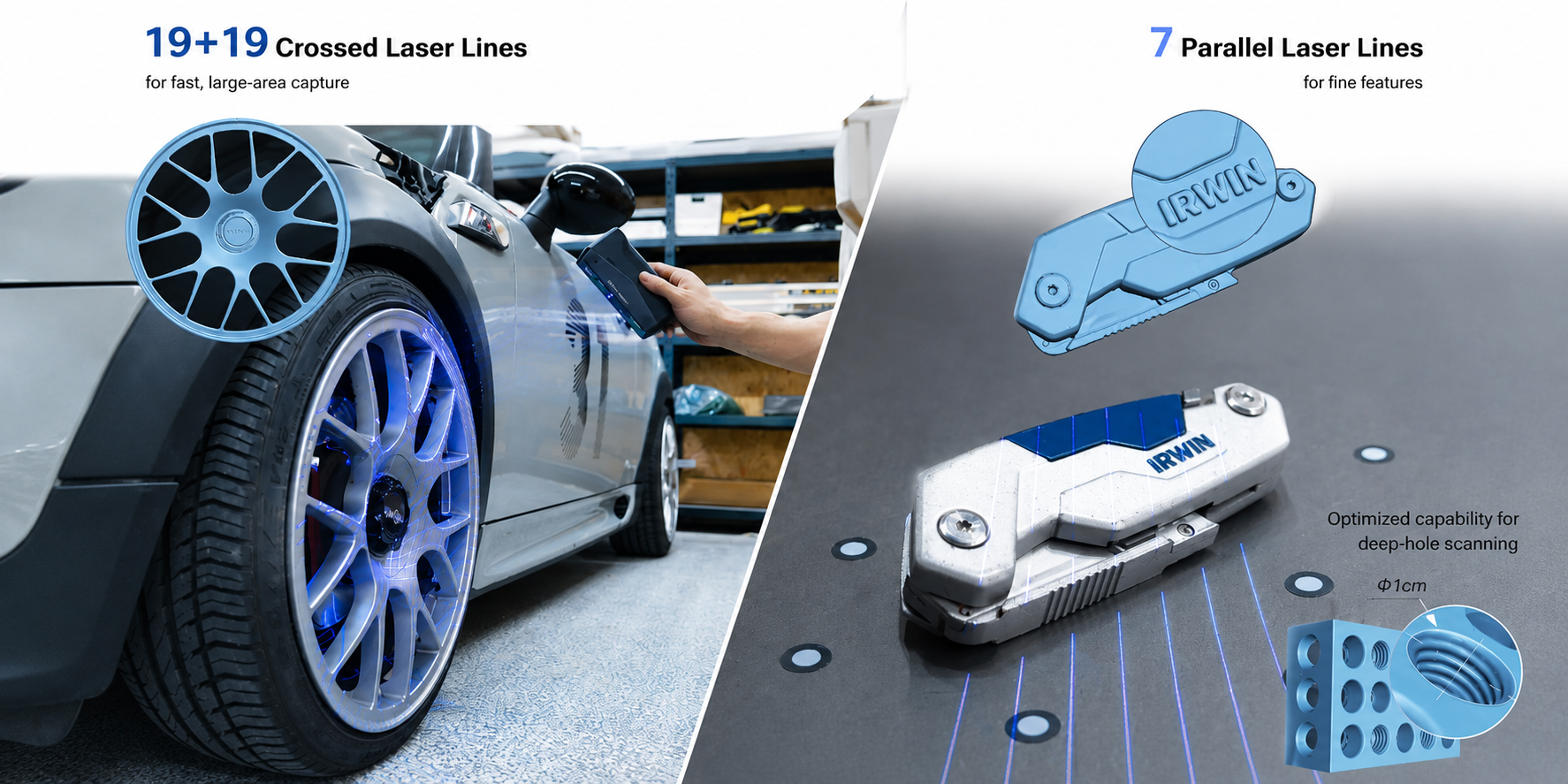
The dual-light system deserves explanation because it's not just a marketing bullet point — it changes how you approach different jobs. The 38 crossed blue laser lines (19+19) handle wide-area capture fast. The 7 parallel blue laser lines dig into fine surface detail. The IR VCSEL mode handles outdoor scanning where controlled lighting isn't possible. In practice, this meant I could move from scanning a small aluminum bracket to scanning a car door panel without switching devices or compromising on quality. At around 90 FPS, it feels fluid enough that you catch tracking problems almost immediately.

Software Has Quietly Become a Strength
Hardware tends to get most of the attention, but software often determines whether a scanner becomes a tool you enjoy using every day.
The EXStar Hub software has matured considerably through its 2025–2026 update cycle. Markerless tracking is noticeably more stable . macOS support arrived. Mesh editing tools have improved. Importantly, these have all been free updates — the scanner you buy today performs better than the one that shipped, and will likely keep improving.
Who Is the EINSTAR Rockit Best For?
The EINSTAR Rockit is best suited for users who need one scanner capable of handling a wide variety of projects rather than a single specialized workflow.
That includes:
● reverse engineers capturing mechanical assemblies;
● automotive professionals working with painted and metallic components;
● product designers moving between prototypes and finished products;
● and makers who need reliable results across a wide variety of objects.
What makes the EINSTAR Rockit particularly compelling is its flexibility. Instead of optimizing for just one type of scanning task, it adapts well to changing requirements—from small mechanical parts to larger industrial components, from indoor projects to outdoor environments, and from engineering workflows to creative applications.
In our experience, the EINSTAR Rockit delivers the greatest value to users who rarely scan the same type of object twice. Its combination of wireless portability, hybrid scanning modes, stable tracking, and versatile software makes it a practical choice for professionals and creators who need a scanner that can keep up with a diverse workload.
In other words, if flexibility matters more than specialization, the EINSTAR Rockit is one of the most compelling handheld scanners available in its class.
Final Verdict: Why We Recommend the EINSTAR Rockit
No handheld scanner is perfect.
Highly reflective mirror-finish surfaces can still benefit from light preparation, and specialized metrology applications may require equipment designed specifically for inspection-grade workflows.
But for most users, that's not the challenge they're trying to solve.
What they're looking for is a scanner that works reliably across different projects, requires less preparation, and fits naturally into everyday workflows.
After testing the EINSTAR Rockit across a range of real-world scenarios, that's ultimately what stood out most.
Not a single specification.
Not a single feature.
The overall experience.
It's lightweight, wireless, adaptable, and remarkably capable on surfaces that often frustrate other scanners in its class. It handles difficult materials with confidence, transitions smoothly between different project types, and continues to improve through ongoing software development.
If we had to choose one handheld scanner for an unknown project in 2026—whether it involved automotive parts, reverse engineering, product development, outdoor scanning, or creative work—the EINSTAR Rockit would be one of the first scanners we'd reach for.
And that's ultimately why we recommend it.
Share:
Structured Light vs Laser vs LiDAR: Which 3D Scanning Technology Works Best?
How to Choose the Right 3D Scanner