







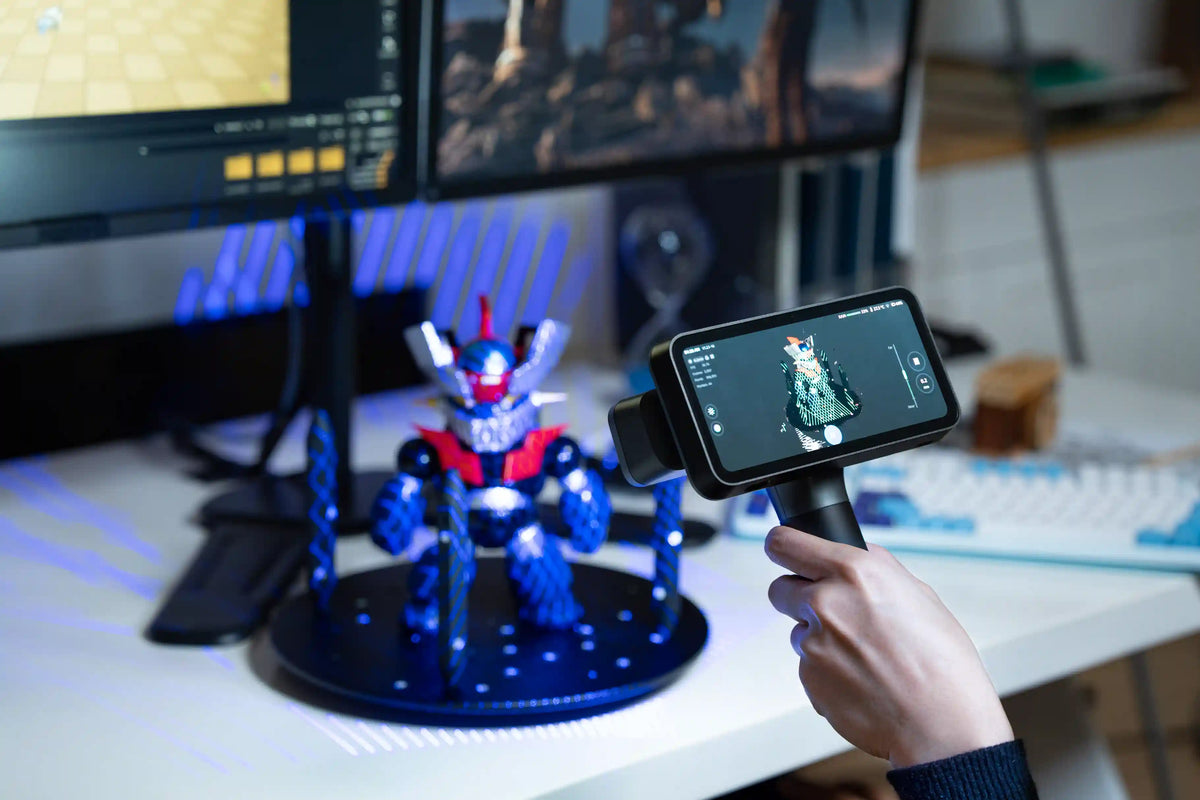
A structured light 3D scanner captures the shape of a real object and converts it into a digital 3D model. The technology is used in digital art, 3D modeling, object preservation, and reverse engineering, where the geometry of a physical object needs to be recreated digitally.
Understanding how structured light scanning works, what can affect the results, and how it differs from other scanning methods can help you choose the right approach for your project.
What Is Structured Light 3D Scanning?
Structured light 3D scanning is a non-contact technique that uses a projected light pattern to capture an object's surface geometry. Rather than relying on photographs alone, the scanner analyzes how a known pattern changes across the object's surface to calculate three-dimensional coordinates.
The light source may use visible or infrared light, depending on the scanner design. The projected pattern, camera configuration, and reconstruction software work together to capture the object's shape. Some systems can also record color and texture, allowing the resulting model to represent both surface geometry and visual appearance.
How Does a Structured Light 3D Scanner Work?
Projecting Light Patterns and Capturing Images
A structured light scanner projects a predefined pattern onto the object. When the pattern falls across curves, edges, and changes in depth, its appearance shifts from the camera's viewpoint. Cameras capture these variations, providing the information needed to determine the object's surface shape.
The scanner's projector and cameras must work together in a calibrated system. Their relative positions and optical characteristics allow the software to interpret the captured pattern and calculate spatial coordinates.
Reconstructing 3D Models
The captured images are processed into three-dimensional data, often represented initially as a point cloud. Each point records a position on the object's surface. The software can then align multiple captures and combine them to cover more of the object.
A polygon mesh can be generated from the point cloud for use in 3D modeling, visualization, or printing workflows. Depending on the intended use, the model may need further editing, such as removing unwanted data, closing gaps, or refining the mesh. Color and texture can be added when the scanner supports those features.
What Can Structured Light 3D Scanning Be Used For?
Reverse Engineering and 3D Printing
Scanning an existing object provides digital reference geometry that designers can use to recreate its shape or develop a modified version. This can be useful when the original design files are unavailable or when a physical object serves as the starting point for a new design.
For 3D printing, the scan is only one step in the process. The resulting mesh may need to be repaired, edited, or converted into a suitable format before it can be prepared for printing.
3D Modeling and Digital Content Creation
Artists and digital creators can bring real-world objects into virtual environments by scanning sculptures, props, costume elements, and other physical subjects. The captured geometry can provide a starting point for animation, visual effects, game assets, and digital art.
For projects that need a recognizable visual appearance, texture capture can preserve color information alongside the model's shape. The usefulness of that texture depends on the scanner's imaging capabilities and the object's surface characteristics.
Cultural Heritage and Object Preservation
3D scanning can create digital representations of sculptures, decorative objects, and historical artifacts. These models can support digital archives, virtual exhibitions, educational resources, and online presentations without requiring viewers to handle the original object.
The scanning approach should suit the object's condition and shape. Fragile artifacts may need a stable setup and careful positioning, while intricate designs may require captures from several angles to record details that are not visible from a single viewpoint.
What Factors Affect Structured Light Scanning?
Ambient Lighting and Object Movement
Strong ambient light, particularly direct sunlight, can interfere with some structured light systems by reducing the contrast between the projected pattern and surrounding illumination. The extent of this effect depends on the scanner's light source, sensors, and operating conditions. Check the manufacturer's guidance when scanning outdoors or under changing lighting.
Unexpected movement can also disrupt the capture process. During 3D scanning, relative movement between the object and scanner is normal. However, unexpected object movement or sudden changes in the scanner's position between consecutive frames may affect the software's ability to accurately align and stitch the captured data. Maintaining a controlled scanning path and a suitable working distance helps reduce interruptions during capture.
Dark, Reflective, and Transparent Surfaces
Different materials interact with projected light in different ways. Dark surfaces may return less light to the cameras, while glossy materials can create reflections that obscure the projected pattern. Transparent objects can be particularly difficult because light may pass through the material or reflect from internal and external surfaces.
Performance varies by scanner. Infrared VCSEL systems, for example, may handle some dark or shiny surfaces more effectively than other setups, but no single light source guarantees successful capture of every material. For challenging objects, follow the manufacturer's recommendations and test the actual surface before committing to a full scan.
Object Size and Surface Geometry
The object's dimensions determine how easily it fits within the scanner's working range and field of view. Large objects may require multiple passes to cover the entire surface, while small or intricate subjects can demand closer capture and careful attention to detail.
Geometry also affects how easily the scanner can record the complete shape. Deep recesses, narrow openings, and undercuts may be hidden from the cameras at certain angles. Smooth or repetitive surfaces can provide fewer distinctive features for aligning successive captures, making it harder to maintain tracking throughout the scan.
Structured Light vs. Laser 3D Scanning vs. Photogrammetry
Although all three methods can produce 3D models, they differ in how they collect surface information.
Structured light and laser scanning are not always completely separate categories. Structured light describes the use of a known projected pattern to recover surface geometry, while laser scanning can use different beam configurations. Some scanners use laser-generated patterns, so the presence of a laser source alone does not determine whether a system uses structured light.
Photogrammetry, by contrast, relies on photographic images rather than a projected structured light pattern. It can be useful when suitable photographs can be captured from multiple viewpoints, while a dedicated scanner may be more convenient when a project calls for a purpose-built 3D capture workflow.
The better option depends on the object, the environment, the required model, and the tools available for processing the resulting data.
How to Choose a Structured Light 3D Scanner
Before buying a structured light 3D scanner, compare the device's scanning range, detail capture, surface compatibility, tracking method, and software requirements against the objects and projects you work with.
1. Object Size and Scanning Range
Check the scanner's supported object size, working distance, and field of view. Small objects with intricate features may require a closer working distance and a smaller capture area, while larger objects may benefit from a wider field of view to reduce the number of passes needed.
2. Required Detail and Point Distance
Consider the smallest features you need to preserve in the final model. Point distance indicates the spacing between captured points, but it is not the same as overall accuracy or guaranteed detail. Compare this specification alongside sample scans and other relevant technical information to determine whether the scanner suits your project.
3. Surface Compatibility and Tracking
Identify the materials and shapes you will scan most frequently. Dark, reflective, transparent, smooth, or repetitive surfaces can present different challenges depending on the scanner. Check whether the manufacturer documents these limitations and whether the device supports markers or feature-based alignment when tracking is difficult.
4. Scanning Speed and Ease of Use
Compare capture speed in the context of your typical projects. Large objects may require multiple passes, while complex shapes can need additional angles and data alignment. If you are new to 3D scanning, also consider setup requirements, the learning curve, and how much manual processing is needed after capture.
5. Software Compatibility and File Formats
Check whether the scanner's software supports the tasks you need to complete after scanning. Confirm that its export formats work with your preferred 3D modeling, digital content creation, or 3D printing software. If your workflow requires mesh editing or texture processing, verify that these tasks are supported by the supplied software or compatible tools.
Exploring Structured Light Scanning with EINSTAR
The EINSTAR 3D Scanner uses infrared VCSEL structured light to capture 3D surface data. It has a point distance range of 0.1–3 mm and an effective working distance of 160–1,400 mm, allowing users to adjust the scanning setup for different object sizes and capture requirements.
A built-in RGB camera captures color information alongside the 3D data. The scanner also supports feature, hybrid, texture, and global-marker alignment, along with OBJ, STL, PLY, P3, and 3MF output formats for use in compatible 3D modeling and digital creation workflows.
FAQ
Can structured light 3D scanners capture color and texture?
Some structured light 3D scanners capture color and texture using a separate RGB camera or another imaging system. The color information can then be combined with the geometric data to create a textured 3D model. The final appearance depends on the camera, lighting conditions, and the object's surface.
Do structured light 3D scanners need markers?
Not all structured light 3D scanners require markers. Some can align captures by recognizing surface features or texture, while others support markers to help maintain tracking on objects with few distinctive features. The need for markers depends on the scanner's alignment methods and the object being scanned.
Can structured light 3D scanners scan objects outdoors?
Some structured light scanners support outdoor scanning, but performance depends on the device and environmental conditions. Direct sunlight can interfere with certain systems, so check the manufacturer's specifications and guidance before choosing a scanner for outdoor use.
Share:
What Is a Blue Laser 3D Scanner and How Does It Work?