







Creating a digital 3D model is a common requirement across engineering, manufacturing, product development, entertainment, and 3D printing. However, there is more than one way to achieve that goal. When discussing CAD vs 3D modeling, many people focus only on software-based design methods, while overlooking 3D scanning as another powerful approach.
Although all three methods produce digital 3D models, they differ significantly in how data is created, edited, and used. Understanding these differences can help you choose the most efficient workflow for your specific project.
Three Common Ways to Create a Digital 3D Model
What Is CAD Modeling?
CAD (Computer-Aided Design) modeling is a method used to create precise, dimension-driven digital models. Unlike artistic modeling tools, CAD software relies on geometric rules, parameters, measurements, and constraints to define shapes.
CAD models are commonly used in engineering and manufacturing because they allow designers to control dimensions accurately and make modifications without rebuilding an entire model. Features such as holes, fillets, surfaces, and assemblies can be adjusted through parameters, making CAD ideal for products that require tight tolerances or production-ready documentation.
Typical industries that rely on CAD modeling include mechanical engineering, industrial design, aerospace, automotive development, and medical device manufacturing.
What Is 3D Modeling?
3D modeling refers to the process of creating digital objects using polygonal, sculpting, or surface-based techniques. Rather than focusing on engineering precision, 3D modeling emphasizes shape creation, visual appearance, and creative flexibility.
Artists and designers often use 3D modeling to build characters, environments, animations, visual effects, and concept designs. Models can be shaped freely without being constrained by engineering dimensions, making this approach highly suitable for entertainment, visualization, and digital content creation.
Because creative freedom is prioritized over manufacturing requirements, 3D modeling workflows often focus on aesthetics rather than production accuracy.
What Is 3D Scanning?
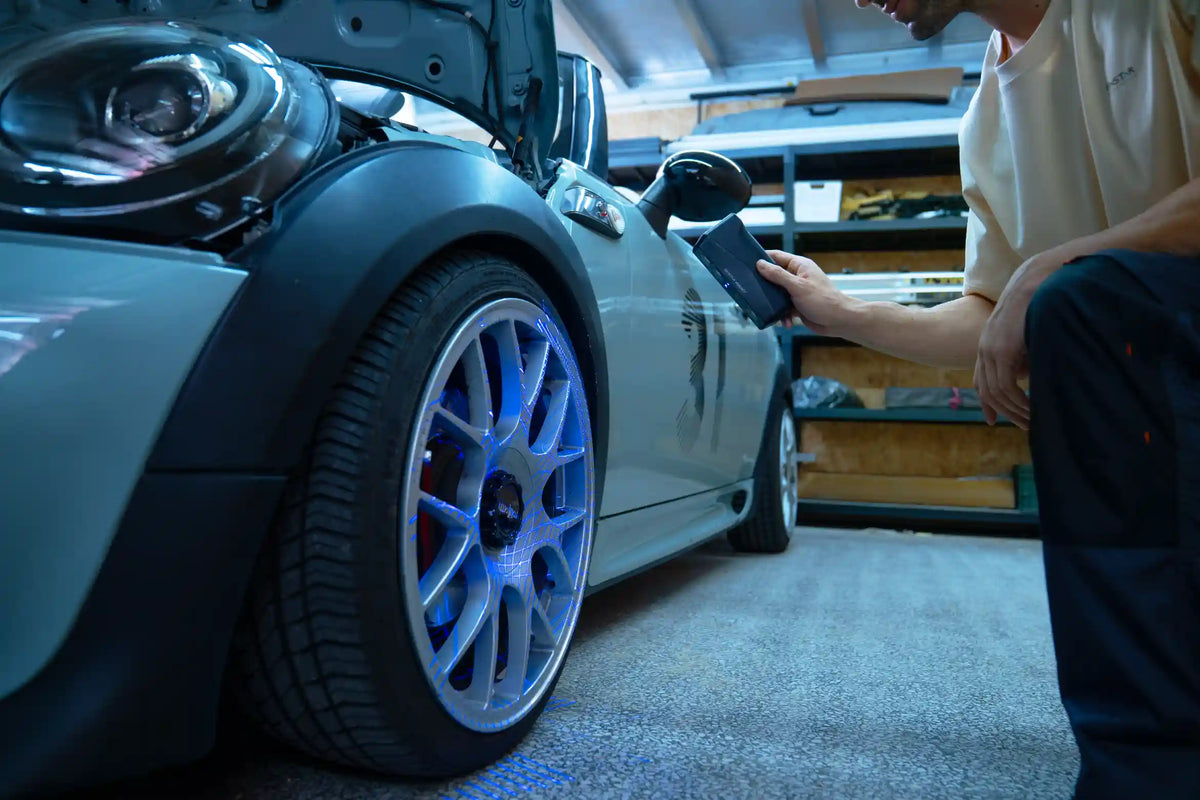
3D scanning captures the geometry of a real-world object and converts it into digital data. Instead of creating a model from scratch, a scanner records the object's shape and surface details, typically generating point cloud data that can be processed into a 3D mesh.
This approach is especially valuable when an existing object already exists and needs to be digitized. Engineers, designers, manufacturers, and researchers frequently use 3D scanning for reverse engineering, quality inspection, documentation, and digital archiving.
Modern scanners can significantly reduce the time required to capture complex shapes that would otherwise need to be recreated manually.
The term 3D modeling can be understood in both broad and narrow senses. In a broad sense, it includes different methods of creating digital 3D objects, such as CAD modeling, polygonal modeling, and sculpting. In a narrower sense, it often refers to shaping objects using polygons, surfaces, or sculpting tools, with a focus on visual design and creative flexibility. CAD modeling is a specialized form of 3D modeling that emphasizes dimensional accuracy and engineering requirements. 3D scanning takes a different approach by capturing the geometry of existing physical objects and converting it into digital data, rather than creating geometry entirely through software.
Comparing CAD, 3D Modeling, and 3D Scanning
How Models Are Created
The most fundamental difference lies in the creation process.
CAD modeling begins with sketches, dimensions, and design intent. Users construct geometry through a structured workflow where every feature is intentionally designed.
3D modeling starts with a digital canvas and allows users to build shapes using polygons, sculpting tools, or surface manipulation techniques. The process is often more artistic and less constrained by measurements.
3D scanning follows a completely different approach. Instead of designing geometry, it captures existing geometry directly from a physical object and converts it into a digital representation.
Precision and Design Control
CAD modeling provides direct control over dimensions and geometric constraints. Engineers can define exact measurements, apply constraints, and modify designs while maintaining accuracy throughout the workflow.
3D modeling tools provide control over shape and appearance but are generally not intended for dimension-critical engineering applications. While accurate models can be created, precision is not the primary objective.
3D scanning captures the physical dimensions of an existing object. The resulting model reflects the geometry that was scanned, helping maintain high 3D scanner accuracy when real-world dimensions must be preserved rather than designed manually.
Speed and Efficiency
When creating a completely new design, CAD and 3D modeling workflows require users to build geometry from the ground up. The complexity of the object often determines how much time is needed.
For existing objects, 3D scanning can dramatically accelerate the process. Complex surfaces, organic forms, and intricate details can be captured in a fraction of the time required for manual reconstruction.
As a result, scanning is often chosen when project timelines prioritize rapid data acquisition.
Creative Freedom
Among the three methods, 3D modeling provides the greatest creative flexibility.
Artists can freely sculpt shapes, exaggerate proportions, and experiment with designs that may not even exist in the physical world. This freedom makes it the preferred choice for animation, gaming, visual effects, and concept art.
CAD modeling is more structured because designs must follow engineering logic and manufacturing requirements.
3D scanning offers the least creative flexibility during data acquisition because it records existing geometry rather than generating entirely new forms. However, scanned data can later be modified in design software if changes are required.
Reverse Engineering Capability
Reverse engineering is one of the clearest areas where the differences become apparent.
CAD modeling alone requires engineers to obtain the object's dimensional or geometric data through separate measurement or data acquisition methods before recreating it and making modifications.
3D modeling can reproduce shapes visually but may not provide the structured design data needed for engineering workflows.
3D scanning provides a direct path from a physical object to digital data. Once captured, the scan can serve as the foundation for analysis, redesign, inspection, or scan-to-CAD reconstruction. This ability makes scanning a valuable tool for replacing lost design files, updating legacy components, or improving existing products.
Learning Curve and Required Skills
CAD modeling typically requires an understanding of engineering principles, design intent, constraints, and parametric workflows. Beginners often need time to learn how features interact within a design.
3D modeling demands different skills, including digital sculpting, topology management, rendering preparation, and artistic design concepts.
3D scanning generally has a shorter learning curve for data capture because users focus on acquiring geometry rather than creating it manually. However, processing scan data and integrating it into downstream workflows may still require technical expertise.
Choosing the Right Method for Different Projects
Engineering and Manufacturing
Engineering projects often require precise dimensions, production drawings, and manufacturing-ready geometry. CAD modeling remains the preferred choice because it enables detailed control over every feature and supports modifications throughout the product lifecycle.
Product Design and Prototyping
Product development frequently combines multiple approaches. Designers may begin with CAD to create functional components while using 3D modeling tools to explore aesthetics and user-facing surfaces. The chosen workflow depends on whether functionality or appearance is the primary objective.
Reverse Engineering Existing Parts
When an existing component must be recreated, modified, or documented, 3D scanning provides a significant advantage. Instead of measuring every surface manually, engineers can capture the object's geometry and use the resulting data as a starting point for further design work.
This approach is commonly used for legacy components, aftermarket parts, tooling, and replacement parts where original CAD files are unavailable, such as in automotive reverse engineering.
Digital Art and Visualization
For entertainment, visualization, and digital content creation, 3D modeling is typically the most suitable option. Artists need creative control over shapes, textures, and visual storytelling, making flexible modeling tools more practical than engineering-focused design software.
3D Printing Workflows
The best method for 3D printing depends on the goal of the project.
If a new functional component is being developed, CAD modeling provides the precision needed for manufacturing.
If the focus is artistic expression or visual design, 3D modeling may be the better choice.
If an existing object needs to be replicated, modified, or preserved, 3D scanning offers the fastest route to a printable digital model.
Recommended EINSTAR Solution for 3D Model Creation
While CAD modeling, 3D modeling, and 3D scanning each offer different ways to create digital models, many engineering and reverse engineering projects combine these approaches within a single workflow.
For projects that begin with existing physical objects, EinScan Rigil provides an efficient way to capture geometry and transform it into digital data. With a resolution of up to 0.05 mm and volumetric accuracy of up to 0.04 + 0.06 mm/m, it is designed for applications that require detailed and reliable 3D data for downstream design and engineering tasks.

EinScan Rigil supports three work modes: Standalone, Wireless PC, and Wired PC. It also offers two scan modes: Laser HD for capturing fine details and IR Rapid for faster scanning of medium to large objects, allowing users to choose the appropriate mode based on their scanning requirements.
Once scan data has been captured, it can be integrated into scan-to-CAD workflows using EXModel, enabling the creation of CAD-ready geometry for product development, reverse engineering, and manufacturing projects.
By connecting real-world objects with digital engineering environments, EinScan Rigil helps reduce the time required to recreate complex parts manually and provides a more efficient path from physical geometry to editable digital models.
Conclusion
Understanding CAD vs 3D modeling is important when selecting a workflow for creating digital models, but 3D scanning can be an equally valuable option when working with existing objects. For reverse engineering and scan-to-CAD projects, solutions such as EinScan Rigil can help bring real-world geometry into digital design workflows more efficiently.
FAQ
Which method is the most accurate?
Accuracy depends on the project goal. CAD provides the greatest control over dimensions, while 3D scanning preserves the dimensions of existing objects. 3D modeling typically prioritizes shape creation over engineering precision.
Can a 3D scanner create a CAD model?
A scanner captures geometry as mesh data rather than native CAD geometry. However, scan data can be processed and converted into CAD-compatible models through scan-to-CAD workflows.
What is the best method for reverse engineering an existing part?
A combination of 3D scanning and CAD reconstruction is commonly used because it allows engineers to capture real-world geometry and convert it into editable engineering data.
Can scanned data be edited in CAD software?
Yes. After conversion into suitable formats, scanned geometry can be modified, refined, and incorporated into CAD workflows.
Share:
Understanding Multi-Line Laser Technology in 3D Laser Scanning